Sound Deck
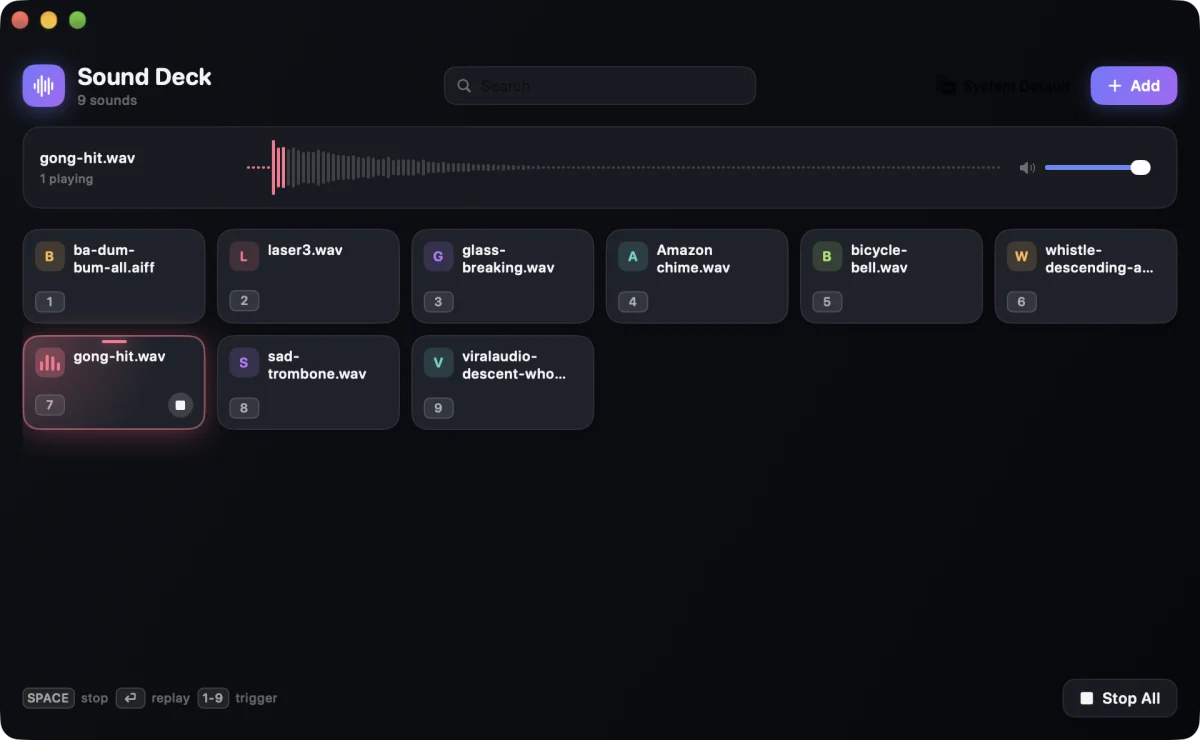
A soundboard for your Mac. One key, one sound, right now. Play them over each other, and send them to your speakers or straight into a call.
Try it
Click a pad, or press 1 to 9
Into the call
Your audience hears it too
Normally only you hear sounds from your Mac. Pick a virtual audio device as the output, and the deck goes into Zoom, Meet, Discord or OBS like a microphone.
- Sound DeckOutput: BlackHole
- BlackHoleA free virtual audio device
- Zoom, Meet, Discord, OBSMicrophone: BlackHole
To send your voice too, join your microphone and BlackHole in an aggregate device in Audio MIDI Setup. The README has every step.
Keys everywhere
Play from any app
Turn on global hotkeys and press ⌃⌥ with a pad's key, even while the call window is in front. Return plays the last sound again.
Or click the menu bar icon for a small deck, and leave the main window closed.
Your deck, your way
Every pad, tuned
- Trim Play only the part you want.
- Loop Keep music or a drone running.
- Volume per pad And one master volume.
- Fade out Sounds stop softly, not with a click.
- Colour and emoji Find the pad at a glance.
- Drag to sort Drop files in, drag pads into order.
Install Sound Deck
- Download the disk image. Open it and drag Sound Deck to your Applications folder.
- Open Sound Deck. It is not notarized by Apple, so macOS stops it the first time. Close the warning.
- Open System Settings › Privacy & Security, find the message about SoundDeck, and click Open Anyway. You do this only once.
- Drag audio files onto the window. Press 1 to 9 to play them.
The sounds on this page are made in your browser. In the app, every pad plays your own audio file.