Bookdrop
Any book in, the format you need out. Drop an EPUB, a Kindle book or a PDF, and get back a PDF, EPUB, TXT, HTML or DOCX. Print-ready PDFs, with the page set the way you like it.
Drag the book here, or
On the Origin of Species
Chapter I
Variation Under Domestication
When we look to the individuals of the same variety or sub-variety of our older cultivated plants and animals, one of the first points which strikes us, is, that they generally differ much more from each other, than do the individuals of any one species or variety in a state of nature.
When we reflect on the vast diversity of the plants and animals which have been cultivated, and which have varied during all ages under the most different climates and treatment, I think we are driven to conclude that this greater variability is simply due to our domestic productions having been raised under conditions of life not so uniform as, and somewhat different from, those to which the parent-species have been exposed in a state of nature.
There is, also, I think, some probability in the view propounded by Andrew Knight, that this variability may be partly connected with excess of food. It seems clear that organic beings must be exposed during several generations to new conditions to cause any great amount of variation; and that, when the organisation has once begun to vary, it generally continues varying for many generations.
17
In and out
Five ways out of almost any book
In
- EPUB
- AZW3
- AZW
- KFX
- MOBI
- PDF with text
Out
- EPUB
- TXT
- HTML
- DOCX
Honest about PDFs. Bookdrop reads PDFs that have a text layer and rebuilds their chapters. A scanned, two-column or locked PDF gets a clear message, not a bad copy.
Made for print
A PDF you can read, or print
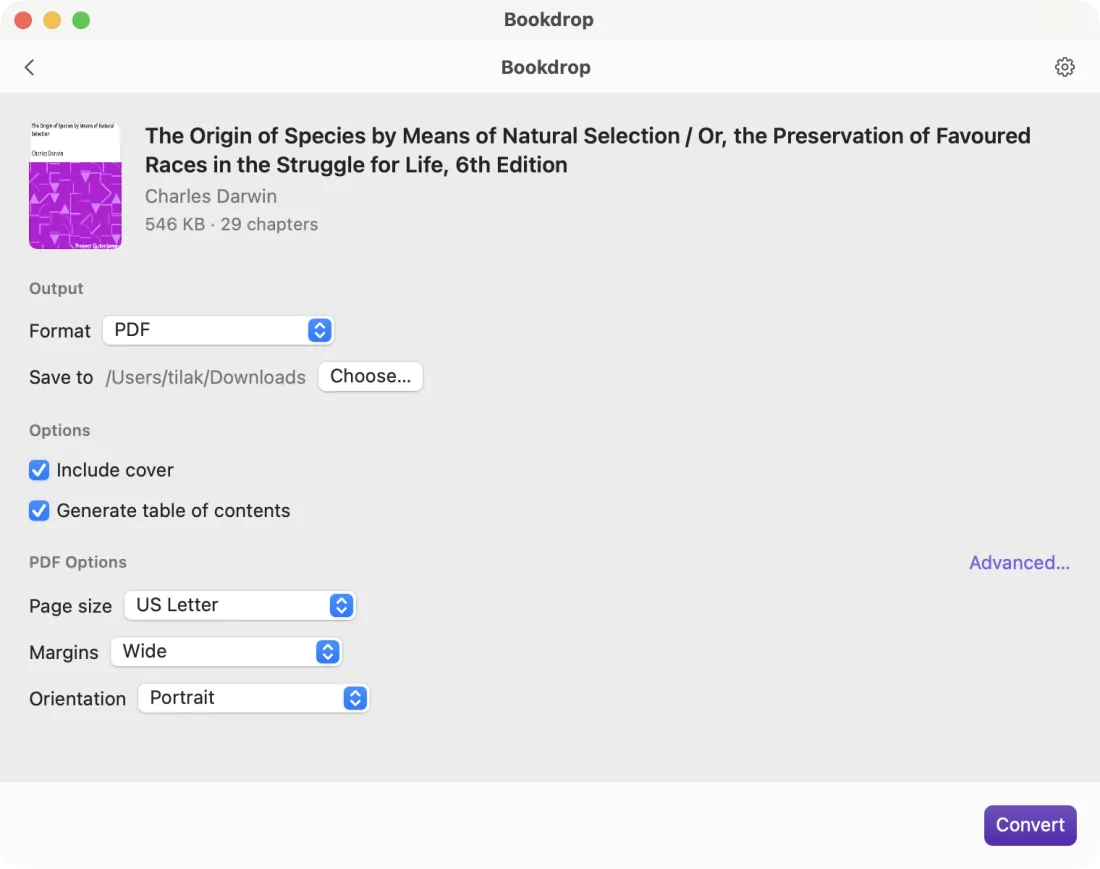
Each chapter is laid out by a copy of Chromium inside the app, so the type looks right. Then the pages join into one PDF with a real table of contents in the sidebar, and the book's own cover on top.
Choose the page size, margins and orientation. Under Advanced: fonts, line spacing, headers, footers and page numbers.
- A stack at once Drop many books, convert all of them to one format, and get a notification when they are done.
- History Every conversion stays in a list, with links back to the book and to the new file.
- Apple Silicon and Intel One app for both. It runs on macOS 13 or later.
- Private Every book is converted on your Mac. No accounts and no uploads.
Install Bookdrop
- Download the disk image. Open it and drag Bookdrop to your Applications folder.
- Open Bookdrop. It is not notarized by Apple, so macOS stops it the first time. Close the warning.
- Open System Settings › Privacy & Security, find the message about Bookdrop, and click Open Anyway. You do this only once.
- Drop a book on the window, choose a format, and click Convert.
The download is large because it includes its own copy of Chromium, which lays out the PDF pages. Bookdrop does not need a browser or an internet connection.